



Hermes Agent
中文简体 | 多国语言
Windows | MacOS | Linux | SWL2+Ubuntu
Hermes Agent 是 Nous Research 开源的自进化 AI 智能体,主打 “越用越聪明”,内置学习闭环与分层持久化记忆,可自动生成并迭代技能,一次部署即可通过多平台网关(QQ/Telegram/ 网页等)提供服务,兼具轻量 Python 内核、40 + 内置工具与企业级安全沙箱,适合打造长期个性化的自动化助手。
安装步骤(Windows系统)
PowerShell 终端内输入自动安装代码
irm https://raw.githubusercontent.com/NousResearch/hermes-agent/main/scripts/install.ps1 | iex
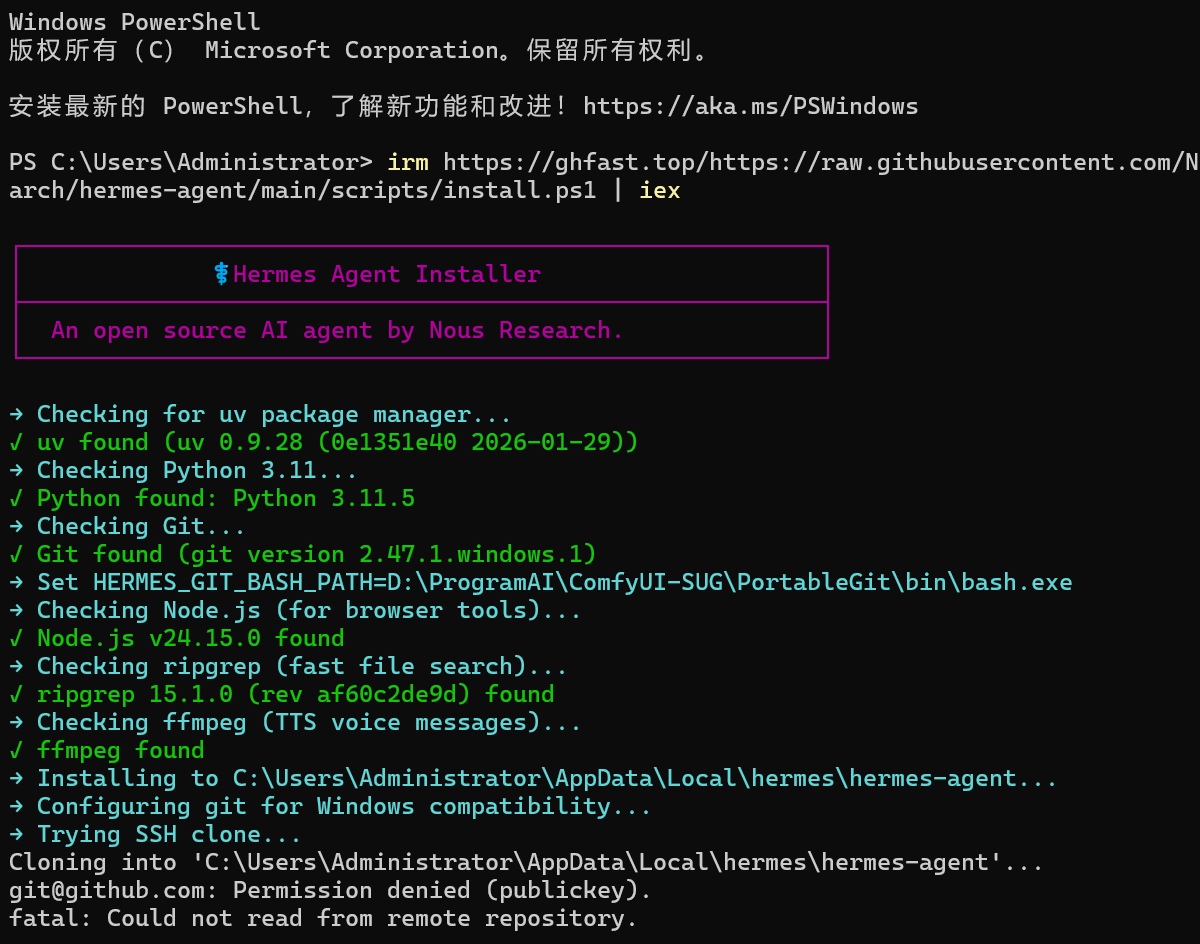
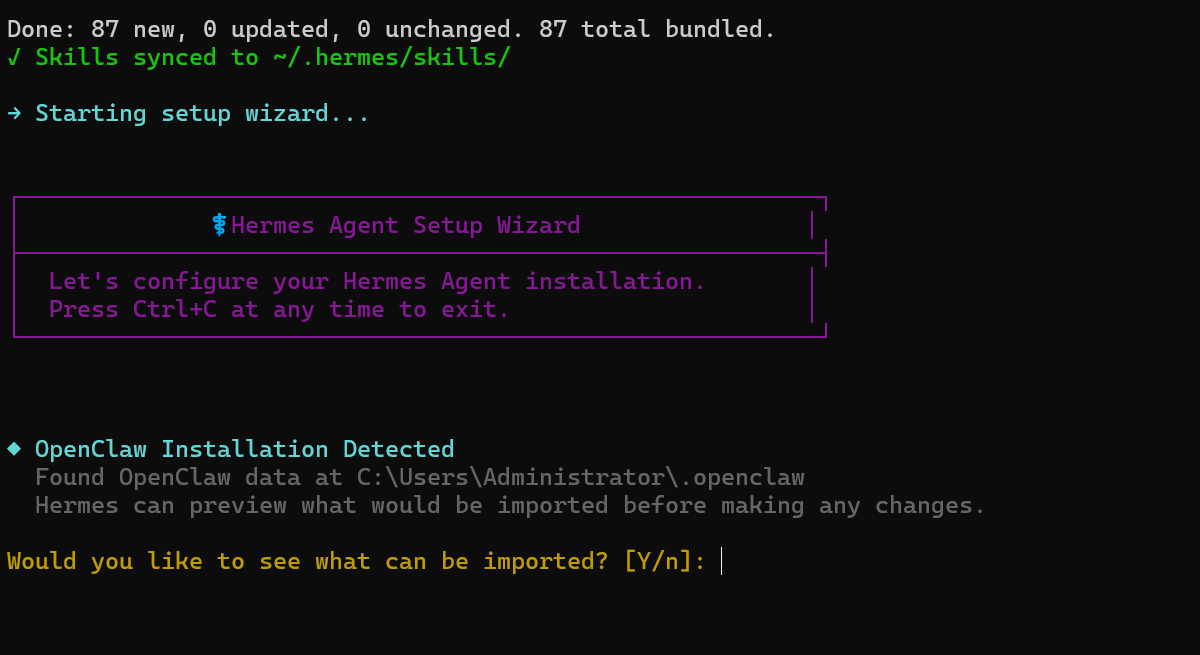
→ Starting setup wizard...→正在启动安装向导...
┌─────────────────────────────────────────────────────────┐
│ ⚕ Hermes Agent Setup Wizard ⚕ 安装爱马仕代理安装向导 │
├─────────────────────────────────────────────────────────┤
│ Let's configure your Hermes Agent installation. 让我们配置您的爱马仕代理安装。 │
│ Press Ctrl+C at any time to exit. 请随时按Ctrl+C退出。 │
└─────────────────────────────────────────────────────────┘
◆ OpenClaw Installation Detected ◆检测到 OpenClaw 安装
Found OpenClaw data at C:\Users\Administrator\.openclaw
Hermes can preview what would be imported before making any changes.
爱马仕可以在进行任何更改之前预览将要导入的内容。
Would you like to see what can be imported? [Y/n]:n
你想看看有什么可以导入的吗?[是/否]:选择n
Skipping migration. You can run it later with: hermes claw migrate --dry-run
正在跳过迁移。您可以稍后使用以下命令运行它:爱马仕claw migrate --dry-run
How would you like to set up Hermes?您希望如何设置爱马仕?
Select by number, Enter to confirm.按编号选择,回车确认。
(●) 1. Quick setup — provider, model & messaging (recommended)
(●)1.快速设置-提供商、型号和消息传递(推荐)
(○) 2. Full setup — configure everything
(○)2.完整设置-配置所有内容
Choice [default 1]:2 选项[默认值1]:2(完整设置)
◆ Inference Provider ◆推理提供者
Choose how to connect to your main chat model. 选择如何连接到您的主聊天模型。
Guide指南: https://hermes-agent.nousresearch.com/docs/integrations/providers
Current model当前型号: anthropic/claude-opus-4.6
Active provider活动提供商: Qwen Cloud
Select provider:选择供应商:
Select by number, Enter to confirm.按编号选择,回车确认。
(○) 1. Nous Portal (Nous Research subscription)
(○) 2. OpenRouter (100+ models, pay-per-use)
(○) 3. NovitaAI (AI-native cloud: Model API, Agent Sandbox, GPU Cloud)
(○) 4. LM Studio (local desktop app with built-in model server)
(○) 5. Anthropic (Claude models — API key or Claude Code)
(○) 6. OpenAI Codex
(●) 7. Qwen Cloud / DashScope Coding (Qwen + multi-provider) ← currently active
(○) 8. Xiaomi MiMo (MiMo-V2.5 and V2 models — pro, omni, flash)
(○) 9. Tencent TokenHub (Hy3 Preview — direct API via tokenhub.tencentmaas.com)
(○) 10. NVIDIA NIM (Nemotron models — build.nvidia.com or local NIM)
(○) 11. GitHub Copilot (uses GITHUB_TOKEN or gh auth token)
(○) 12. GitHub Copilot ACP (spawns `copilot --acp --stdio`)
(○) 13. Hugging Face Inference Providers (20+ open models)
(○) 14. Google AI Studio (Gemini models — native Gemini API)
(○) 15. Google Gemini via OAuth + Code Assist (free tier supported; no API key needed)
(○) 16. DeepSeek (DeepSeek-V3, R1, coder — direct API)
(○) 17. xAI (Grok models — direct API)
(○) 18. Z.AI / GLM (Zhipu AI direct API)
(○) 19. Kimi Coding Plan (api.kimi.com) & Moonshot API
(○) 20. Kimi / Moonshot China (Moonshot CN direct API)
(○) 21. StepFun Step Plan (agent/coding models via Step Plan API)
(○) 22. MiniMax (global direct API)
(○) 23. MiniMax via OAuth browser login (Coding Plan, minimax.io)
(○) 24. MiniMax China (domestic direct API)
(○) 25. Ollama Cloud (cloud-hosted open models — ollama.com)
(○) 26. Arcee AI (Trinity models — direct API)
(○) 27. GMI Cloud (multi-model direct API)
(○) 28. Kilo Code (Kilo Gateway API)
(○) 29. OpenCode Zen (35+ curated models, pay-as-you-go)
(○) 30. OpenCode Go (open models, $10/month subscription)
(○) 31. AWS Bedrock (Claude, Nova, Llama, DeepSeek — IAM or API key)
(○) 32. Azure Foundry (OpenAI-style or Anthropic-style endpoint — your Azure AI deployment)
(○) 33. Vercel AI Gateway
(○) 34. Qwen OAuth (reuses local Qwen CLI login)
(○) 35. Alibaba Cloud Coding Plan — dedicated coding tier
(○) 36. custom (direct API)
(○) 37. Custom endpoint (enter URL manually)
(○) 38. Configure auxiliary models...
(○) 39. Leave unchanged
Choice [default 7]: 24 (选择大模型序号)
◆ Same-Provider Fallback & Rotation ◆同提供商回退和轮换
Hermes can keep multiple credentials for one provider and rotate between
them when a credential is exhausted or rate-limited. This preserves
your primary provider while reducing interruptions from quota issues.
爱马仕可以为一个提供商保留多个凭据,并在当凭证耗尽或速率受限时,它们会被删除。这保持您的主要提供商,同时减少配额问题造成的中断。
Current pooled credentials for minimax-cn: 1 (0 manual, 1 auto-detected from env/shared auth)
minimax-cn的当前池凭据:1(0手动,1从env/共享身份验证自动检测)
Add another credential for same-provider fallback? [y/N]:
为同一提供程序回退添加另一个凭据?[y/N]:N(选择备用模型,一般不需要)
Select TTS provider: 选择TTS提供程序:
Select by number, Enter to confirm. 按编号选择,回车确认。
(○) 1. Edge TTS (free, cloud-based, no setup needed)
(○) 2. ElevenLabs (premium quality, needs API key)
(○) 3. OpenAI TTS (good quality, needs API key)
(○) 4. xAI TTS (Grok voices, needs API key)
(○) 5. MiniMax TTS (high quality with voice cloning, needs API key)
(○) 6. Mistral Voxtral TTS (multilingual, native Opus, needs API key)
(○) 7. Google Gemini TTS (30 prebuilt voices, prompt-controllable, needs API key)
(○) 8. NeuTTS (local on-device, free, ~300MB model download)
(○) 9. KittenTTS (local on-device, free, lightweight ~25-80MB ONNX)
(●) 10. Keep current (Edge TTS)
Choice [default 10]:选择[默认值10]:10(Edge TTS免费就很好)
Select terminal backend: 选择终端后端:
Select by number, Enter to confirm. 按编号选择,回车确认。
(○) 1. Local - run directly on this machine (default) / 本地-直接在此计算机上运行(默认)
(○) 2. Docker - isolated container with configurable resources / Docker -具有可配置资源的隔离容器
(○) 3. Modal - serverless cloud sandbox / Modal -无服务器云沙箱
(○) 4. SSH - run on a remote machine / SSH -在远程机器上运行
(○) 5. Daytona - persistent cloud development environment / Daytona -持久云开发环境
(○) 6. Vercel Sandbox - cloud microVM with snapshot filesystem persistence / 具有快照文件系统持久性的云microVM
(●) 7. Keep current (local) / 保持最新(本机)
Choice [default 7]: 选择[默认值7]:(默认本机)
◆ Agent Settings ◆代理设置
Guide 指南 : https://hermes-agent.nousresearch.com/docs/user-guide/configuration
Maximum tool-calling iterations per conversation. / 最大工具=每次会话调用迭代。
Higher = more complex tasks, but costs more tokens. / 更高=更复杂的任务,但需要更多的tokens.。
Press Enter to keep 60. Use 90 for most tasks or 150+ for open exploration. / 按Enter键保持60。对于大多数任务使用90,对于开放式探索使用150+。
Max iterations [60]: 最大迭代次数[60]:60
Tool Progress Display / 工具进度显示
Controls how much tool activity is shown (CLI and messaging). / 控制显示多少工具活动(CLI和消息传递)。
off — Silent, just the final response / 关闭 - 沉默,只是最后的回应
new — Show tool name only when it changes (less noise) / 新 - 仅在更改时显示工具名称(噪音更少)
all — Show every tool call with a short preview / 所有 - 通过简短预览显示每个工具调用
verbose — Full args, results, and debug logs / 冗长 - 完整的参数、结果和调试日志
Tool progress mode [all]: 工具进度模式[全部]:all
◆ Context Compression / ◆上下文压缩
Automatically summarizes old messages when context gets too long. / 当上下文过长时自动总结旧消息。
Higher threshold = compress later (use more context). Lower = compress sooner. / 较高的阈值=稍后压缩(使用更多上下文)。较低=更快压缩。
Compression threshold (0.5-0.95) [0.5]: / 压缩阈值(0.5-0.95)[0.5]:默认回车
Session reset mode: / 会话重置模式:
Select by number, Enter to confirm. / 按编号选择,回车确认。
(●) 1. Inactivity + daily reset (recommended - reset whichever comes first) / 1.不活动+每日重置(建议-重置,以先发生者为准)
(○) 2. Inactivity only (reset after N minutes of no messages) / 2.仅不活动(N分钟无消息后重置)
(○) 3. Daily only (reset at a fixed hour each day) / 3.仅限每日(每天固定时间重置)
(○) 4. Never auto-reset (context lives until /reset or context compression) / 4.从不自动重置(上下文在/reset或上下文压缩之前一直存在)
(○) 5. Keep current settings / (○)5.保持当前设置
Choice [default 1]: / 选择[默认值1]:
Inactivity timeout (minutes) [1440]: / 多久没有操作就自动断开连接(分钟)[1440]:(24小时)
Daily reset hour (0-23, local time) [4]: / 每日统计数据的重置时间 (当地时间0-23) [4]: (凌晨四点比较合理)
Select platforms to configure: / 选择要配置的平台:
Toggle by number, Enter to confirm. / 按数字切换,回车确认。
[ ] 1. 📱 Telegram (not configured)
[ ] 2. 💬 Discord (not configured)
[ ] 3. 💼 Slack (not configured)
[ ] 4. 💬 Mattermost (not configured)
[ ] 5. 📲 WhatsApp (not configured)
[ ] 6. 📡 Signal (not configured)
[ ] 7. 📧 Email (not configured)
[ ] 8. 📱 SMS (Twilio) (not configured)
[ ] 9. 💬 DingTalk (not configured)
[ ] 10. 🪽 Feishu / Lark (not configured)
[ ] 11. 💬 WeCom (Enterprise WeChat) (not configured)
[ ] 12. 💬 WeCom Callback (Self-Built App) (not configured)
[ ] 13. 💬 Weixin / WeChat (not configured)
[ ] 14. 💬 BlueBubbles (iMessage) (not configured)
[ ] 15. 🐧 QQ Bot (not configured)
[ ] 16. 💎 Yuanbao (not configured)
[ ] 17. 💬 Google Chat (not configured)
[ ] 18. 💬 IRC (not configured)
[ ] 19. 💚 LINE (not configured)
[ ] 20. 💼 Microsoft Teams (not configured)
Toggle # (or Enter to confirm): / 切换#(或按Enter键确认):13(接入聊天软件)
Tools for 🖥️ CLI / 用于安装CLI的工具
Toggle by number, Enter to confirm. / 按数字切换,回车确认。
[✓] 1. 🔍 Web Search & Scraping (web_search, web_extract) 网站搜索&抓取
[✓] 2. 🌐 Browser Automation (navigate, click, type, scroll) 浏览器自动化
[✓] 3. 💻 Terminal & Processes (terminal, process) 终端和流程
[✓] 4. 📁 File Operations (read, write, patch, search) 文件操作(读、写、修补、搜索)
[✓] 5. ⚡ Code Execution (execute_code) 代码执行
[✓] 6. 👁️ Vision / Image Analysis (vision_analyze) 视觉/图像分析
[ ] 7. 🎬 Video Analysis (video_analyze (requires video-capable model)) 视频分析-需要支持视频的模型
[✓] 8. 🎨 Image Generation (image_generate) 图像生成
[ ] 9. 🎬 Video Generation (video_generate (text-to-video + image-to-video)) [no API key] 视频生成
[ ] 10. 🧠 Mixture of Agents (mixture_of_agents) [no API key] 代理混合
[✓] 11. 🔊 Text-to-Speech (text_to_speech) 文本转语音
[✓] 12. 📚 Skills (list, view, manage) 管理技能
[✓] 13. 📋 Task Planning (todo) 任务计划
[✓] 14. 💾 Memory (persistent memory across sessions) 持久内存(跨会话的持久内存)
[✓] 15. 🔎 Session Search (search past conversations) 会话搜索(搜索过去的会话)
[✓] 16. ❓ Clarifying Questions (clarify) 澄清问题
[✓] 17. 👥 Task Delegation (delegate_task) 任务委派
[✓] 18. ⏰ Cron Jobs (create/list/update/pause/resume/run, with optional attached skills) Cron作业(创建/列表/更新/暂停/恢复/运行,可选附加技能)
[✓] 19. 📨 Cross-Platform Messaging (send_message) 跨平台消息传递
[ ] 20. 🧪 RL Training (Tinker-Atropos training tools) [no API key] RL培训(Tinker-Atropos培训工具)[无API密钥]
[ ] 21. 🏠 Home Assistant (smart home device control) [no API key] 智能家居助理(智能家居设备控制)[无API密钥]
[ ] 22. 🎵 Spotify (playback, search, playlists, library) Spotify(播放,搜索,播放列表,库)
[ ] 23. 🤖 Yuanbao (group info, member queries, DM) 元宝(群信息,会员查询,DM)
[✓] 24. 🖱️ Computer Use (macOS) (background desktop control via cua-driver) 计算机使用(macOS)(通过cua-driver进行后台桌面控制)
Toggle # (or Enter to confirm): / 切换#(或按Enter键确认):
--- 🌐 Browser Automation - Choose a provider ------ 🌐 浏览器自动化——选择服务提供商---
Choose a provider: / 选择提供商:
Select by number, Enter to confirm. / 按编号选择,回车确认。
(●) 1. Local Browser [★ recommended · free] — Headless Chromium, no API key needed / 本地浏览器[★推荐·免费] -无头Chromium,无需API密钥
(○) 2. Browserbase [paid] — Cloud browser with stealth and proxies / Browserbase [付费] -具有隐身和代理的云浏览器
(○) 3. Browser Use [paid] — Cloud browser with remote execution / 浏览器使用[付费] -带远程执行的云浏览器
(○) 4. Firecrawl [paid] — Cloud browser with remote execution / Firecrawl [付费] -具有远程执行功能的云浏览器
(○) 5. Camofox [free · local] — Anti-detection browser (Firefox/Camoufox) /Camofox [免费·本地] -反检测浏览器(Firefox/Camoufox)
(○) 6. Skip — keep defaults / configure later / 跳过-保留默认值/稍后配置
Choice [default 1]: 默认回车
--- 🖱️ Computer Use (macOS) (cua-driver (background)) ---
--- 🖱️ 计算机使用(macOS)(cua-driver(后台))---
macOS background computer-use via SkyLight SPIs — does NOT steal your cursor or focus. Works with any model. / macOS后台电脑通过SkyLight SPI使用——不会窃取你的光标或焦点。任何型号都适用。
⚠ Computer Use (cua-driver) is macOS-only; skipping. / 计算机使用(cua驱动)仅限macOS;跳过
✓ cua-driver (background) - no configuration needed! / cua-driver(背景)——无需配置!
--- 🎨 Image Generation - Choose a provider ------ 🎨 图像生成 - 选择服务提供商---
Choose a provider: 选择服务提供商:
Select by number, Enter to confirm. 按数字选择,输入以确认。
(●) 1. FAL.ai [paid] — Pick from flux-2-klein, flux-2-pro, gpt-image, nano-banana, etc. / FAL.ai [付费] — 可以从flux-2-klein、flux-2-pro、gpt-image、nano-banana等中选择。
(○) 2. OpenAI [paid] — gpt-image-2 at low/medium/high quality tiers / OpenAI【付费】——gpt-image-2,低/中/高质量层级
(○) 3. OpenAI (Codex auth) [free] — gpt-image-2 via ChatGPT/Codex OAuth — no API key required / OpenAI(Codex 认证)[免费] — 通过 ChatGPT/Codex OAuth 获取 gpt-image-2 — 无需 API 密钥
(○) 4. xAI (Grok) [paid] — Native xAI image generation via grok-imagine-image / xAI(Grok)[付费] — 通过 grok-imagine-image 原生生成 xAI 图像
(○) 5. Skip — keep defaults / configure later / 跳过——保留默认值/稍后配置
Choice [default 1]: 选择[默认1]:3(需要有Codex账号,免费)
--- 🔊 Text-to-Speech - Choose a provider ------ 🔊 文本转语音——选择服务提供商---
Choose a provider: 选择服务提供商:
Select by number, Enter to confirm. 按数字选择,输入以确认。
(●) 1. Microsoft Edge TTS [★ recommended · free] — Good quality, no API key needed [active] [★推荐·免费] — 质量良好,无需API密钥[有效]
(○) 2. OpenAI TTS [paid] — High quality voices [付费] — 高质量语音
(○) 3. xAI TTS — Grok voices - requires xAI API key 需要 xAI API 密钥
(○) 4. ElevenLabs [paid] — Most natural voices 【付费】——最自然的声音
(○) 5. Google Gemini TTS [preview] — 30 prebuilt voices, controllable via prompts / [预览] — 30个预建语音,可通过提示控制
(○) 6. KittenTTS [local · free] — Lightweight local ONNX TTS (~25MB), no API key / [本地·免费] — 轻量级本地ONNX TTS(~25MB),无API密钥
(○) 7. Piper [local · free] — Local neural TTS, 44 languages (voices ~20-90MB) / [本地·免费] — 本地神经TTS,44种语言(语音~20-90MB)
(○) 8. Skip — keep defaults / configure later / 跳过——保留默认值/稍后配置
Choice [default 1]: 选择[默认1]:(Edge TTS 免费好用)
--- 🔍 Web Search & Extract - Select Search Provider ----搜索 网页搜索和提取-选择搜索提供商-
A free DuckDuckGo search skill is also included — skip this if you don't need a premium provider.一个免费的DuckDuckGo搜索技能也包括在内-跳过这一点,如果你不需要一个溢价提供商。
Select Search Provider:选择搜索提供程序:
Select by number, Enter to confirm.按编号选择,回车确认。
(●) 1. Firecrawl Self-Hosted [free · self-hosted] — Run your own Firecrawl instance (Docker)
(○) 2. Brave Search (Free) [free] — Free-tier API key — 2k queries/mo, search only.
(○) 3. DuckDuckGo (ddgs) [free · no key · search only] — Search via the ddgs Python package — no API key (pair with any extract provider)
(○) 4. Exa [paid] — Semantic + neural web search with content extraction.
(○) 5. Firecrawl [paid · optional gateway] — Full search + extract + crawl; supports direct API and Nous tool-gateway routing.
(○) 6. Parallel [paid] — Objective-tuned search + parallel page extraction.
(○) 7. SearXNG [free · self-hosted] — Free, privacy-respecting metasearch. Point SEARXNG_URL at your instance.
(○) 8. Tavily [paid] — Search + extract + crawl in one provider.
(○) 9. Skip — keep defaults / configure later
Choice [default 1]:选项[默认值1]:
--- 🎬 Video Generation - Choose a provider ------ 🎬 视频生成——选择服务提供商---
Choose a provider:选择服务提供商:
Select by number, Enter to confirm.按数字选择,输入以确认。
(●) 1. FAL [paid] — LTX, Pixverse, Veo 3.1, Seedance 2.0, Kling 4K, Happy Horse — text-to-video & image-to-video
(○) 2. xAI [paid] — grok-imagine-video — text-to-video & image-to-video with reference images
(○) 3. Skip — keep defaults / configure later /跳过——保留默认值/稍后配置
Choice [default 1]:选择[默认1]:3(跳过)
✓ 配置完成!
📁 所有文件都在 ~/AppData\Local\hermes/:
配置文件:C:\Users\Administrator\AppData\Local\hermes\config.yaml
API Keys:C:\Users\Administrator\AppData\Local\hermes\.env
数据:C:\Users\Administrator\AppData\Local\hermes/cron/, sessions/, logs/
────────────────────────────────────────────────────────────
📝 编辑你的配置:
重新运行完整向导:hermes setup
更改型号/供应商:hermes setup model
更改终端后端:hermes setup terminal
配置消息传递:hermes setup gateway
配置工具提供程序:hermes setup tools
查看当前设置:hermes config
在编辑器中打开配置:hermes config edit
设置特定值:hermes config set <key> <value>
或者直接编辑文件:
nano C:\Users\Administrator\AppData\Local\hermes\config.yaml
nano C:\Users\Administrator\AppData\Local\hermes\.env
────────────────────────────────────────────────────────────
🚀 准备开始!
开始聊天:hermes
启动消息网关:hermes gateway
检查问题:hermes doctor